1 video
12.99USD
USD 12.99 per video
- 16s · 720p · 16:9
- Original audio · MP4 for your account
- Unused credits do not expire
- Failed tasks restore the credit
SAME SCENE. YOUR DUO.
Turn two separate people or pet photos into the white-studio keyboard meme: one keyboard player, one expressive partner. Get a 16-second, 720p, 16:9 MP4 with the original audio. No prompt writing or app installation.
People, pets, or a little of both.
Sign in with Google first, then choose your photos.
Private uploads. Photos kept up to 7 days. Download videos within 30 days.
THE TREND, EXPLAINED
Alors on Danse AI refers to AI remakes of the Stromae and Jamel Debbouze comedy sketch from Made in Jamel (2010). The fun is in casting a new duo into the original interaction: the performer at the keyboard, and the partner reacting alongside.
Use your photos to recreate the Stromae keyboard meme with friends, a partner or pets. The scene is built in: upload one photo for each role and generate in your browser. This is a photo-to-video tool, not a live camera filter.
Read the origin of the trend →REFERENCE & REAL RESULTS
See the two input photos beside their generated dog-and-human video, then watch the white-studio scene reference. Turn on sound to hear the original audio.
Explore examples →GENERATED WITH THIS WEBSITE
TWO INPUT PHOTOS
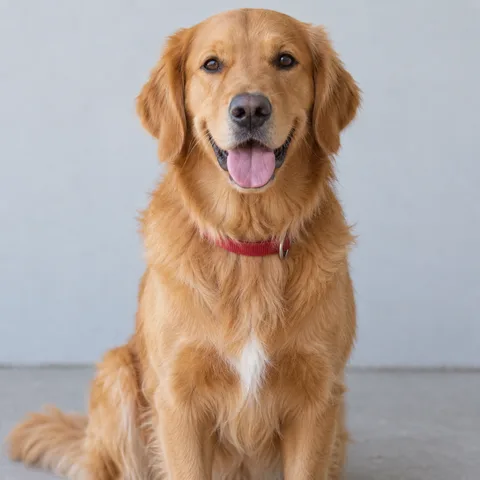

GENERATED RESULT · 16 seconds / 480p
Two synthetic photos become a dog-and-human studio duo. The dog plays the keyboard while its partner claps and moves toward the camera. This 16-second example was generated with our tool at 480p; purchased videos are 720p.
WHITE-STUDIO REFERENCE · 16 seconds / 480p
Keyboard player and partner in the white studio. Scene and audio reference supplied by the site owner.
THREE SIMPLE STEPS
Sign in with Google, then upload a separate photo of the first subject. Photo 01 plays the keyboard on the left.
Photo 02 becomes the expressive partner on the right. Try two friends, a couple, two pets, or you and your pet.
Check both roles, use one video credit, and follow progress in My videos. Download the finished MP4 within 30 days.
CHOOSE YOUR CAST
Give each role its own photo with one subject. A bright, sharp portrait with an unobstructed face helps the generator recognize a person. For pets, show the face, ears and body clearly so their species and appearance are easier to follow. You do not need a keyboard or a studio in your photos.
Skip group shots, collages, tiny distant subjects, heavy blur and filters that hide the face. JPG, PNG and WebP files are supported up to 10 MB each. Before you generate, make sure the left photo is the keyboard player and the right photo is the partner you want.
Cast two friends for an inside joke, a couple for a shared reaction, or yourself and your pet for an unexpected duet. Choose photos you have permission to use and get the person’s consent.
Read the photo and role guide →COMPARE YOUR OPTIONS
Choose by the scene you want and how much you want to edit. This website is built for one keyboard meme; filming, templates and general AI tools offer different kinds of control.
Swipe sideways to compare all four methods →
| Compare | Alors on Danse AI | Film it yourself | CapCut template | Write your own AI prompt |
|---|---|---|---|---|
| What you prepare | Two separate photos, one subject per role | Two performers, a keyboard, a suitable set and a camera | Photos or clips required by your chosen template | Photos, a scene prompt and any references the tool accepts |
| Scene and timing | Built-in white-studio keyboard scene, guided by a fixed reference | Arrange the set, rehearse both roles and edit the takes | Effects and pacing follow the selected template; features vary | Describe positions, gestures and camera work; review the result |
| Audio | The fixed original audio is included in the MP4 | Record or add audio and align it in an editor | Use the template’s audio or edit music where supported | Audio generation and reference support depend on the tool |
| People and pets | Two people, two pets or a mixed duo; AI likeness can vary | Film subjects who can take part; pets need different staging | Depends on the template and its media or AI features | Depends on the model, references and prompt |
| Cost | From $12.99 for one video; confirmed failures return the credit | Your filming time, equipment and editing costs | Free or paid options; check the template and export conditions | Check the tool’s generation prices and failure policy |
| Choose it when… | You want this specific 16-second meme with your own duo | You want a real performance and control over every take | You want to edit existing media using a template you like | You want a different scene, music or format to experiment with |
CapCut also offers AI tools; this column describes template workflows, not every CapCut feature. Template availability and payment terms can change. CapCut template guide ↗
Make the keyboard meme from my photos →BUILT FOR THIS MEME
Choose the two subjects; the white studio, keyboard roles, movement reference and original audio are already arranged. You can make this specific scene without setting up a shoot or writing a detailed AI prompt.
Buy 1, 3 or 10 videos when you need them, without a subscription. Unused credits do not expire. A confirmed failed generation automatically returns its credit so you can try another video.
Photos and finished videos are only accessible through your account. Photos are kept for up to 7 days and videos for 30 days. Watch the actual examples before buying to judge likeness and movement; AI can change fine details. Watch the examples →
PAY FOR THE VIDEOS YOU MAKE
No subscription. One credit makes one 16-second, 720p video with original audio.
USD 12.99 per video
About USD 11.66 per video
About USD 10.00 per video
Prices in USD before applicable taxes. Completed videos are stored for 30 days; download them before expiry. Refund policy ↗
A LITTLE CONTEXT
Discover the Stromae and Jamel keyboard meme, what changes in an AI remake, and why you need two photos.
02 / GUIDEA step-by-step guide to choosing people or pet photos, assigning the two roles, and downloading your finished meme video.
ONE STAGE OF MANY
The white-studio keyboard duet also has its own page on AI Effect Studio, our collection of AI video effects. Cast your duo there, or browse the other trending effects that sit alongside it.
Make the Alors on Danse AI video on AI Effect Studio →BEFORE YOUR FIRST TAKE
It turns two uploaded photos into an AI remake of the Stromae and Jamel Debbouze white-studio keyboard sketch. Your subjects become the keyboard player and partner with the original audio. It generates a saved video from photos; it is not a live camera filter.
The Alors on Danse template is built into this website. Upload one photo for the left keyboard player and another for the right partner; the scene, movement reference and audio are already set. There is no template file to download or prompt to write. Your finished video downloads as an MP4.
Both photo slots are required. Use two separate images with one clear subject in each; you cannot leave a role empty to keep an original actor. If you only have a group photo, crop each subject into a separate image first. Avoid collages and make sure both cropped faces are still clear.
You can choose two people, two pets, or a person and a pet. For pets, choose a clear face and visible body rather than a distant subject curled into a small shape. The scene asks pets to take an upright, human-like pose while keeping their species features; anatomy and motion can vary.
Choose a sharp, well-lit portrait with a face or muzzle that is large enough to recognize. Avoid heavy filters, obscured faces, strong blur, text over the subject, and extreme angles. JPG, PNG and WebP are accepted, up to 10 MB per photo. You do not need to photograph the subjects in a white studio.
The photos guide appearance, but AI can change fine facial details, fur, clothing, hands or paws. Movement and the camera can also differ from the reference. Review actual examples to understand the look; identical likeness and frame-for-frame motion are not guaranteed.
Each video is a 16-second, 720p, 16:9 landscape MP4 with the fixed original audio. It follows the white studio and two-role keyboard scene. Any published test sample is labeled with its actual resolution, which may differ from the standard output.
This generator makes one specific keyboard meme. The original audio, scene, 16-second length and landscape format are fixed. You choose the two subjects and their roles; there are no custom scene or music controls.
One video is $12.99. A 3-video pack is $34.99 (about $11.66 per video), and a 10-video pack is $99.99 (about $10.00 per video). Prices are in USD before applicable taxes. These are one-time purchases, with no subscription or recurring charge.
Unused video credits have no expiry at launch. Finished videos are stored online for 30 days, so download your MP4 before that date. The 30-day storage period is different from the life of your unused credits; a copy you download is saved on your own device.
Time depends on the queue and processing. You can leave the page and return to My videos with the same Google account to check progress. There is no guaranteed minute count. Check an active task before starting another.
A confirmed failed task automatically restores one video credit. An uncertain outcome stays visible while it is checked, so do not submit the same video again. Restoring a credit lets you generate another video; it is different from a cash refund. For billing or refund questions, contact support with your task or receipt details.
Your uploads and generated videos are private to your account. Photos are kept for up to 7 days and videos for 30 days. You can download or delete a finished video in My videos. Deleting a result is permanent and does not restore its credit; public examples require separate permission.
Sign in with Google to upload photos, buy a video pack and keep your history together. There is no free generation offer. You can watch the original scene and published examples before deciding whether to buy. Purchases are closed whenever generation is unavailable.
Use photos you own or have permission to upload, and get the person’s consent. Friends, couples and a person with their pet can make different duos in the same scene. The video is AI-generated entertainment; do not present it as footage of something the person actually did.
Download your MP4 from My videos within 30 days, then upload it to your preferred platform or send it to friends. The file is 16:9 landscape. For a vertical post, keep the whole frame or crop it in an editor, checking that both roles remain visible. There is no automatic social posting or vertical export. Review your permissions and the platform’s rules before sharing.
YOUR CAST. THEIR MOMENT.