SEE THE SCENE
Alors on Danse AI examples.
Watch the white-studio reference, the original comedy sketch and a real result generated with this website. The generated example includes its two actual input photos, so you can see how the subjects become the keyboard player and partner.
GENERATED WITH THIS WEBSITE
TWO INPUT PHOTOS
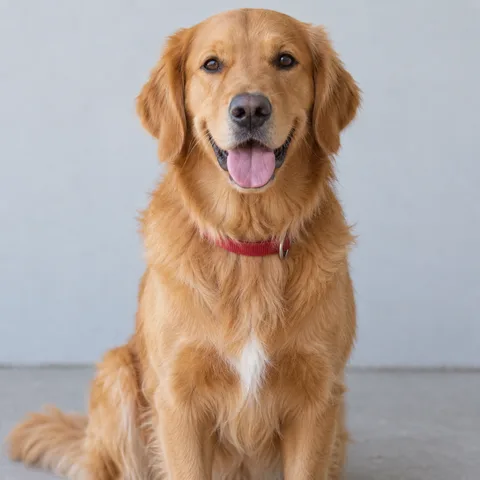
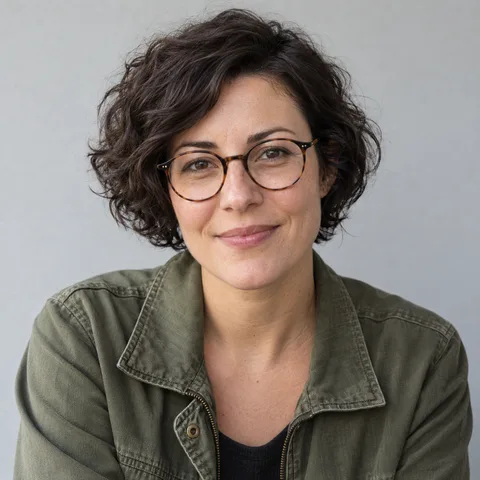
GENERATED RESULT · 16 seconds / 480p
Two synthetic photos become a dog-and-human studio duo. The dog plays the keyboard while its partner claps and moves toward the camera. This 16-second example was generated with our tool at 480p; purchased videos are 720p.
WHITE-STUDIO REFERENCE · 16 seconds / 480p
Keyboard player and partner in the white studio. Scene and audio reference supplied by the site owner.
What to look for in an example
Check whether both subjects remain recognizable, the keyboard and partner roles are clear, and the reactions follow the original beat. Listen to the audio as well as watching the motion. Faces, fur, clothing and small hand or paw details can change during AI generation.
The dog-and-human example was generated from the two photos shown above at 480p. The supplied reference shows the target scene and audio. Purchased videos are 16 seconds, 720p and 16:9; appearance and motion vary with each pair of photos. Choose better photos →
BEFORE YOUR FIRST TAKE
Alors on Danse AI FAQ
Can I use just one photo or a group photo?
Both photo slots are required. Use two separate images with one clear subject in each; you cannot leave a role empty to keep an original actor. If you only have a group photo, crop each subject into a separate image first. Avoid collages and make sure both cropped faces are still clear.
Can I make a video with pets?
You can choose two people, two pets, or a person and a pet. For pets, choose a clear face and visible body rather than a distant subject curled into a small shape. The scene asks pets to take an upright, human-like pose while keeping their species features; anatomy and motion can vary.
Which photos work best?
Choose a sharp, well-lit portrait with a face or muzzle that is large enough to recognize. Avoid heavy filters, obscured faces, strong blur, text over the subject, and extreme angles. JPG, PNG and WebP are accepted, up to 10 MB per photo. You do not need to photograph the subjects in a white studio.
Will the subjects look exactly like their photos?
The photos guide appearance, but AI can change fine facial details, fur, clothing, hands or paws. Movement and the camera can also differ from the reference. Review actual examples to understand the look; identical likeness and frame-for-frame motion are not guaranteed.
What video will I receive?
Each video is a 16-second, 720p, 16:9 landscape MP4 with the fixed original audio. It follows the white studio and two-role keyboard scene. Any published test sample is labeled with its actual resolution, which may differ from the standard output.
Can I use photos of friends or other people?
Use photos you own or have permission to upload, and get the person’s consent. Friends, couples and a person with their pet can make different duos in the same scene. The video is AI-generated entertainment; do not present it as footage of something the person actually did.
How do I download and share my video?
Download your MP4 from My videos within 30 days, then upload it to your preferred platform or send it to friends. The file is 16:9 landscape. For a vertical post, keep the whole frame or crop it in an editor, checking that both roles remain visible. There is no automatic social posting or vertical export. Review your permissions and the platform’s rules before sharing.